


Olá pessoal. alguém conseguiu replicar os efeitos e correções das grids do bento.me? Eu usei o React Grid Layout, mas é cheio de bugs!
Tem esse codigo que corrige um pouco a parte de cima e deixando parecido.
Meu codigo:
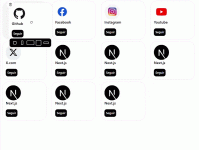
Bento.me:
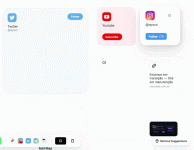
Codigo que fez fix da primeira linha:
Quem puder ajudar deixe comentário abaixo!
Tem esse codigo que corrige um pouco a parte de cima e deixando parecido.
Meu codigo:
Bento.me:
Codigo que fez fix da primeira linha:
JavaScript:
import * as RGL_UTILS from 'react-grid-layout/build/utils';
import {
  sortLayoutItems,
  cloneLayoutItem,
  getAllCollisions,
  Layout,
  LayoutItem,
  CompactType
} from 'react-grid-layout/build/utils';

// ============================================
// COMPACT - Compactação Horizontal + Vertical
// ============================================
RGL_UTILS.compact = function compact(
  layout: Layout,
  compactType: CompactType,
  cols: number,
  allowOverlap?: boolean
): Layout {
  // Se permite overlap, não compacta
  if (allowOverlap) return layout;

  // Pega os itens estáticos primeiro
  const compareWith = RGL_UTILS.getStatics(layout);
  const sorted = sortLayoutItems(layout, compactType);
  const out = Array(layout.length);

  for (let i = 0, len = sorted.length; i < len; i++) {
    let l = cloneLayoutItem(sorted[i]);

    // Não move elementos estáticos
    if (!l.static) {
      l = RGL_UTILS.compactItem(
        compareWith,
        l,
        compactType,
        cols,
        sorted,
        allowOverlap
      );
      // Adiciona ao array de comparação
      compareWith.push(l);
    }

    // Adiciona ao array de saída na posição original
    out[layout.indexOf(sorted[i])] = l;
    l.moved = false;
  }

  return out;
};

// ============================================
// SYNCHRONIZE LAYOUT WITH CHILDREN
// ============================================
RGL_UTILS.synchronizeLayoutWithChildren = function synchronizeLayoutWithChildren(
  initialLayout: Layout,
  children: any,
  cols: number,
  compactType: CompactType,
  allowOverlap?: boolean
): Layout {
  initialLayout = initialLayout || [];

  // Gera um item de layout por child
  const layout: Layout = [];

  // Importa React para usar Children API
  const React = require('react');

  React.Children.forEach(children, (child: any) => {
    if (child?.key == null) return;

    const exists = RGL_UTILS.getLayoutItem(initialLayout, String(child.key));
    const g = child.props?.['data-grid'];

    if (exists && g == null) {
      layout.push(cloneLayoutItem(exists));
    } else {
      if (g) {
        // Valida o layout em desenvolvimento
        if (process.env.NODE_ENV !== 'production') {
          RGL_UTILS.validateLayout([g], 'ReactGridLayout.children');
        }
        layout.push(cloneLayoutItem({ ...g, i: child.key }));
      } else {
        // Adiciona no final se não houver configuração
        layout.push(
          cloneLayoutItem({
            w: 1,
            h: 1,
            x: 0,
            y: RGL_UTILS.bottom(layout),
            i: String(child.key)
          })
        );
      }
    }
  });

  // Corrige os limites
  const correctedLayout = RGL_UTILS.correctBounds(layout, { cols });

  // Retorna compactado ou não dependendo do allowOverlap
  return allowOverlap ? correctedLayout : RGL_UTILS.compact(correctedLayout, compactType, cols);
};

// ============================================
// MOVE ELEMENT - Mantém ordem ao arrastar
// ============================================
type MoveElementParams = {
  layout: Layout;
  l: LayoutItem;
  x?: number;
  y?: number;
  isUserAction?: boolean;
  preventCollision?: boolean;
  compactType: CompactType;
  cols: number;
  allowOverlap?: boolean;
  isLeftShift?: boolean;
};

RGL_UTILS.moveElement = function moveElement(
  layout: Layout,
  l: LayoutItem,
  x?: number,
  y?: number,
  isUserAction?: boolean,
  preventCollision?: boolean,
  compactType?: CompactType,
  cols?: number,
  allowOverlap?: boolean,
  isLeftShift?: boolean
): Layout {
  // Se for estático e não explicitamente arrastável, retorna
  if (l.static && l.isDraggable !== true) return layout;

  // Se não há mudança, retorna
  if (l.y === y && l.x === x) return layout;

  const oldX = l.x;
  const oldY = l.y;

  // Atualiza posição
  if (typeof x === 'number') l.x = x;
  if (typeof y === 'number') l.y = y;
  l.moved = true;

  // Ordena os itens para comparação
  let sorted = sortLayoutItems(layout, compactType);
  const movingUp =
    compactType === 'vertical' && typeof y === 'number'
      ? oldY >= y
      : compactType === 'horizontal' && typeof x === 'number'
      ? oldX >= x
      : false;

  if (movingUp) sorted = sorted.reverse();
  const collisions = getAllCollisions(sorted, l);
  const hasCollisions = collisions.length > 0;

  // Se permite overlap, apenas clona e retorna
  if (hasCollisions && allowOverlap) {
    return RGL_UTILS.cloneLayout(layout);
  }

  // Se previne colisão, reverte a posição
  if (hasCollisions && preventCollision) {
    l.x = oldX;
    l.y = oldY;
    l.moved = false;
    return layout;
  }

  // ====== FIX: Detecta direção do movimento ======
  let newIsLeftShift = isLeftShift;
  let isVerticalMovement = false;

  if (isUserAction) {
    isUserAction = false;

    // Detecta se é movimento vertical (Y mudou)
    if (oldY !== y) {
      isVerticalMovement = true;
      newIsLeftShift = undefined; // Limpa flag para movimento vertical
    } else if (oldX !== x) {
      // Movimento horizontal (X mudou)
      newIsLeftShift = oldX - (x || 0) <= 0;
    }
  }

  // Resolve colisões
  for (let i = 0, len = collisions.length; i < len; i++) {
    const collision = collisions[i];

    if (collision.moved) continue;

    if (collision.static) {
      layout = moveElementAwayFromCollision(
        layout,
        collision,
        l,
        isUserAction,
        compactType,
        cols || 12,
        newIsLeftShift,
        isVerticalMovement
      );
    } else {
      layout = moveElementAwayFromCollision(
        layout,
        l,
        collision,
        isUserAction,
        compactType,
        cols || 12,
        newIsLeftShift,
        isVerticalMovement
      );
    }
  }

  return layout;
};

// ============================================
// MOVE ELEMENT AWAY FROM COLLISION
// ============================================
function moveElementAwayFromCollision(
  layout: Layout,
  collidesWith: LayoutItem,
  itemToMove: LayoutItem,
  isUserAction?: boolean,
  compactType?: CompactType,
  cols: number = 12,
  isLeftShift?: boolean,
  isVerticalMovement?: boolean
): Layout {
  const compactH = compactType === 'horizontal';
  const compactV = compactType === 'vertical';
  const preventCollision = collidesWith.static;

  // Se é ação do usuário, tenta mover para cima/esquerda primeiro
  if (isUserAction) {
    isUserAction = false;

    const fakeItem: LayoutItem = {
      x: compactH ? Math.max(collidesWith.x - itemToMove.w, 0) : itemToMove.x,
      y: compactV ? Math.max(collidesWith.y - itemToMove.h, 0) : itemToMove.y,
      w: itemToMove.w,
      h: itemToMove.h,
      i: '-1'
    };

    const firstCollision = RGL_UTILS.getFirstCollision(layout, fakeItem);

    if (!firstCollision) {
      return RGL_UTILS.moveElement(
        layout,
        itemToMove,
        compactH ? fakeItem.x : undefined,
        compactV ? fakeItem.y : undefined,
        isUserAction,
        preventCollision,
        compactType,
        cols
      );
    }
  }

  // ====== FIX: Se for movimento vertical, sempre move verticalmente ======
  if (isVerticalMovement) {
    return RGL_UTILS.moveElement(
      layout,
      itemToMove,
      undefined, // Não muda X
      itemToMove.y + 1, // Move para baixo
      isUserAction,
      preventCollision,
      compactType,
      cols,
      undefined,
      undefined // Limpa isLeftShift
    );
  }

  // ====== Lógica de troca lateral (apenas para movimento horizontal) ======
  // Se estão na mesma linha, faz swap horizontal
  if (itemToMove.y === collidesWith.y && isLeftShift !== undefined) {
    const deltaShift = isLeftShift ? -1 : 1;

    // Verifica se precisa quebrar linha
    const isTileWrapping = isLeftShift
      ? itemToMove.x - 1 < 0
      : itemToMove.x + 1 >= cols;

    if (isTileWrapping) {
      // Quebra para próxima/anterior linha
      const newX = isLeftShift ? cols - 1 : 0;
      const newY = itemToMove.y + deltaShift;

      return RGL_UTILS.moveElement(
        layout,
        itemToMove,
        newX,
        newY,
        isUserAction,
        preventCollision,
        compactType,
        cols,
        undefined,
        isLeftShift
      );
    } else {
      // Move horizontalmente na mesma linha
      const newX = itemToMove.x + deltaShift;

      return RGL_UTILS.moveElement(
        layout,
        itemToMove,
        newX,
        itemToMove.y, // Mantém o Y
        isUserAction,
        preventCollision,
        compactType,
        cols,
        undefined,
        isLeftShift
      );
    }
  }

  // Caso padrão: move para baixo (vertical)
  let newX = itemToMove.x;
  let newY = itemToMove.y + 1;

  if (compactH) {
    newX = itemToMove.x + 1;
  }

  return RGL_UTILS.moveElement(
    layout,
    itemToMove,
    compactH ? newX : undefined,
    newY,
    isUserAction,
    preventCollision,
    compactType,
    cols,
    undefined,
    undefined // Limpa isLeftShift para não confundir próximas iterações
  );
}

// ============================================
// EXPORTA FUNÇÕES AUXILIARES
// ============================================
export { RGL_UTILS };
export default RGL_UTILS;
Código:
Quem puder ajudar deixe comentário abaixo!
Última edição: